Yannick
App Store creative assets · 2026
Match the artwork to the reason someone searched.
Connect the search promise, product-page story, and in-app destination without treating organic discovery and advertising as the same channel.
Name the job
Use a specific need, not a broad demographic.
Show the evidence
Make the relevant capability recognizable immediately.
Measure the journey
Separate exposure, page conversion, and downstream use.
Search artwork is an opportunity to explain relevance before someone opens the App Store product page. A beautiful brand scene can still be the wrong answer to a narrow search. This guide shows how to plan intent-specific concepts, pair them with custom product pages, and avoid attributing every movement in downloads to a new image.
Quick answer
Choose a real user job, show one recognizable piece of evidence, and carry the same promise into the destination page. Apple supports separate search creative and keyword-specific custom product pages, but those are different controls. Prepare and review both deliberately; a new graphic alone is not a keyword-ranking strategy.
Official Apple search-result examples
Use the actual reference below to separate search artwork from a screenshot carousel. Apple's illustration pairs three queries with Forest Explorer, Airline, and The Coast. It is a documented placement example, not a captured ranking result or proof that a particular asset increased downloads.
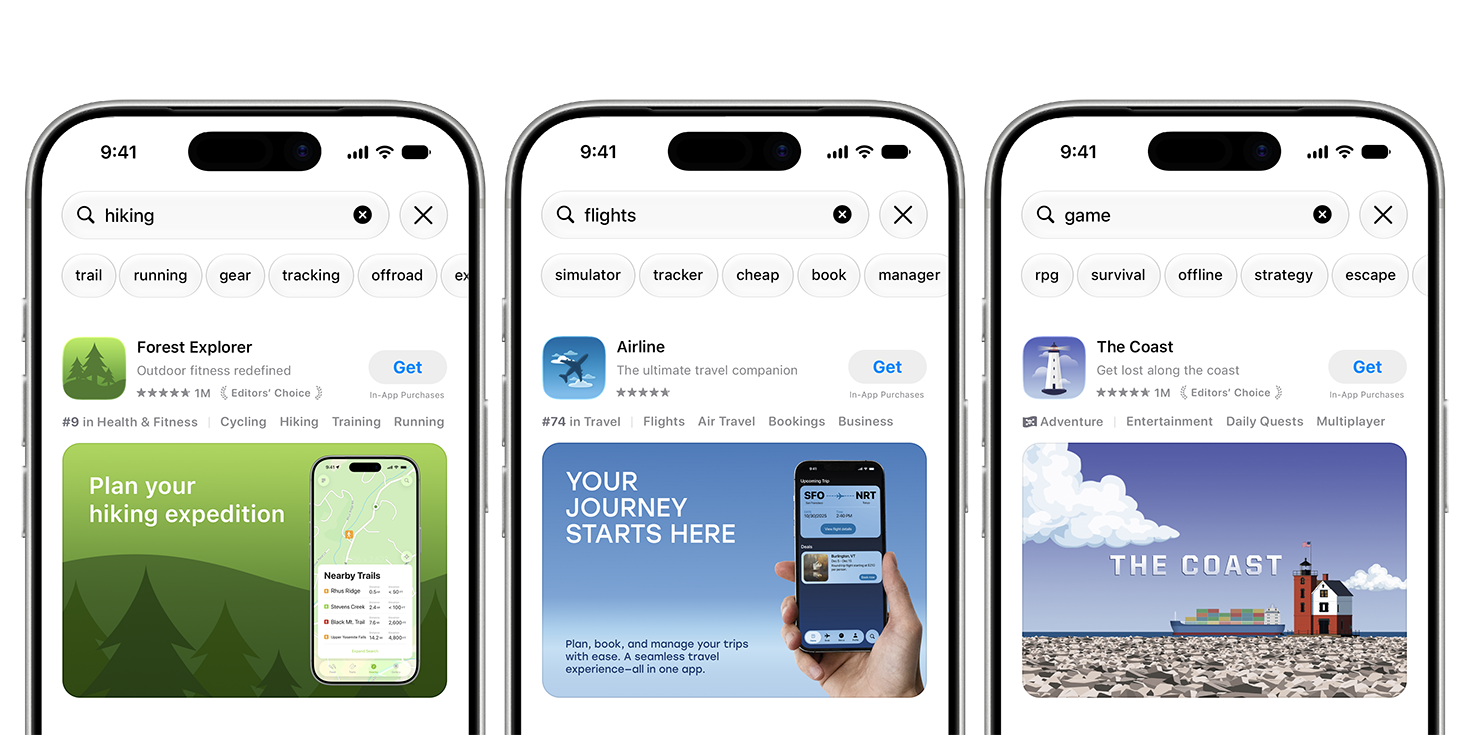
Apple's search examples connect a hiking query to a map-led composition, flights to a travel interface, and a game query to The Coast's illustrated world. Compare the same apps' header compositions rather than treating the two placements as identical crops.
Source: Apple Developer — App Store asset best practices · View full size
Image © Apple. Apple's documentation illustration, verified October 7, 2026; not a verified live listing, an AppLaunchFlow export, or a conversion case study.
Bring your screenshots and brand materials into the graphics studio to develop the artwork, then validate and publish the final assets in App Store Connect.
Search artwork, screenshots, CPPs, and ads are different controls
The search creative is an image or video placement. A custom product page is an audience-specific destination with its own story and URL. Apple allows approved CPPs to appear for assigned relevant keywords; paid Apple Ads variations are another route to a CPP. Organic keyword assignment and paid targeting should not be described as one setting.
Start by deciding what problem you are solving. If visitors cannot recognize the app's relevant use case, improve the artwork. If they tap but arrive at a generic story, improve the destination. If you lack exposure for a term, review discoverability and eligibility rather than assuming a new banner fixes ranking.
Build a query-to-creative-to-page map
These are planning hypotheses for a fictional outdoor app, not measured keywords or volume estimates. Group the searcher's job first, then choose a visual and page story that make the promise specific. Only build a page for a capability the app actually delivers.
Prioritize the intent for which you have both useful traffic evidence and a differentiated experience. If every row leads to the same feature sequence, consolidate the rows rather than creating several near-identical CPPs. Write down the expected benefit and a way to detect a mismatch before producing the artwork.
| Search intent | Creative evidence | Page story | In-app destination |
|---|---|---|---|
| Find a nearby walking route | A readable short trail and distance | Nearby discovery → difficulty → navigation | Nearby route list |
| Plan a cycling ride | A cycling route and elevation context | Route planning → terrain → saved rides | Cycling route planner |
| Navigate a saved route offline | A genuine downloaded-map state | Download → offline navigation → coverage limits | Offline maps or download setup |
Design a readable 3:2 search composition
Dedicated search images use a 3:2 canvas; the full specification is in our creative-assets guide. Build a visual hierarchy that survives thumbnail scale. A dominant result and one supporting detail are usually easier to recognize than a row of tiny device screens. Use a real UI element when it makes the capability obvious, without turning the artwork into an unreadable miniature interface.
Review the candidate beside the header and the first screenshot. The three can look different but should make the same promise. For a universal asset, check both placements in Apple's preview; shared compatibility does not mean identical cropping or identical effectiveness. Search motion should make sense without sound and without waiting for the final frame.
Connect the creative to a custom product page
Give each candidate a coherent destination brief: the audience job, creative promise, first screenshot, supporting evidence, and next action. A CPP tailored to cycling should not open with a hiking-only screenshot sequence. Likewise, an offline-map promise needs an honest explanation of download setup and limitations before the user installs.
Configure keyword assignment, campaign routing, and any deep link in the appropriate Apple workflow. Confirm approval and availability before sending traffic. Apple's CPP guidance recommends relevant intent and unique keyword combinations per page. Do not claim that AppLaunchFlow assigns keywords or publishes a CPP merely because it prepared the creative files.
Measure exposure separately from conversion
Keep a launch log with the creative revision, destination page, locale, keyword or campaign context, and approval date. Compare equal complete windows. First ask whether the artwork was shown to a comparable audience; then ask whether the page converted that audience; finally ask whether those installers reached the promised in-app experience.
Lower click volume can come from less exposure, a different audience, seasonality, or reporting delay. Higher conversion can come from narrower targeting rather than better art. When several elements change together, report the combined result and its uncertainty. Use a controlled treatment when eligible rather than presenting a simple before-and-after as causal proof.
- Keep organic and paid traffic separate; they differ in targeting and intent.
- Inspect country and device mix before interpreting an aggregate rate.
- Record downstream activation or paid conversion separately from an install.
- Avoid declaring a winner from a tiny number of downloads or a partial day.
Continue the workflow
Primary sources and verification notes
Platform requirements and software capabilities change. These sources were reviewed for this guide on October 7, 2026; open the current source again before publishing assets, enabling production access, or standardizing a team workflow.
- Apple: custom product pages: Audience-specific pages, keyword intent, unique URLs, and deep links.
- Apple: asset best practices and templates: Official creative guidance and placement templates; not a promise of conversion uplift.
- Apple: creative asset specifications: The current image and video upload requirements. Check them again before final export.
- Apple: manage your App Store assets: Asset Library, review, placement assignment, previews, and updates to live pages.
Search-Result Assets FAQ
Does a new search image improve keyword ranking?
A graphic is not a direct keyword configuration or a guarantee of ranking. Treat artwork, metadata, CPP keyword eligibility, paid targeting, and conversion measurement as separate parts of the discovery workflow.
Can custom product pages appear in organic search?
Apple documents keyword assignment for CPPs so a relevant page can appear for selected terms. Follow the current approval and configuration rules and keep keyword combinations specific to the intended page.
Should search artwork match my header exactly?
The promise and visual identity should align, but the composition can change. Dedicated artwork lets you frame for each placement; a universal image is useful only when one composition survives both previews.