
AppLaunchFlow
vs
Screenshots.pro

The Screenshots.pro Alternative
powered by AI, not API.

Screenshots.pro offers device mockups and API automation. AppLaunchFlow takes a different approach: upload your screenshots, AI extracts everything it needs, and generates store-ready layouts, ASO copy, and promo videos automatically.

Upload screenshots → AI generates layouts and copy
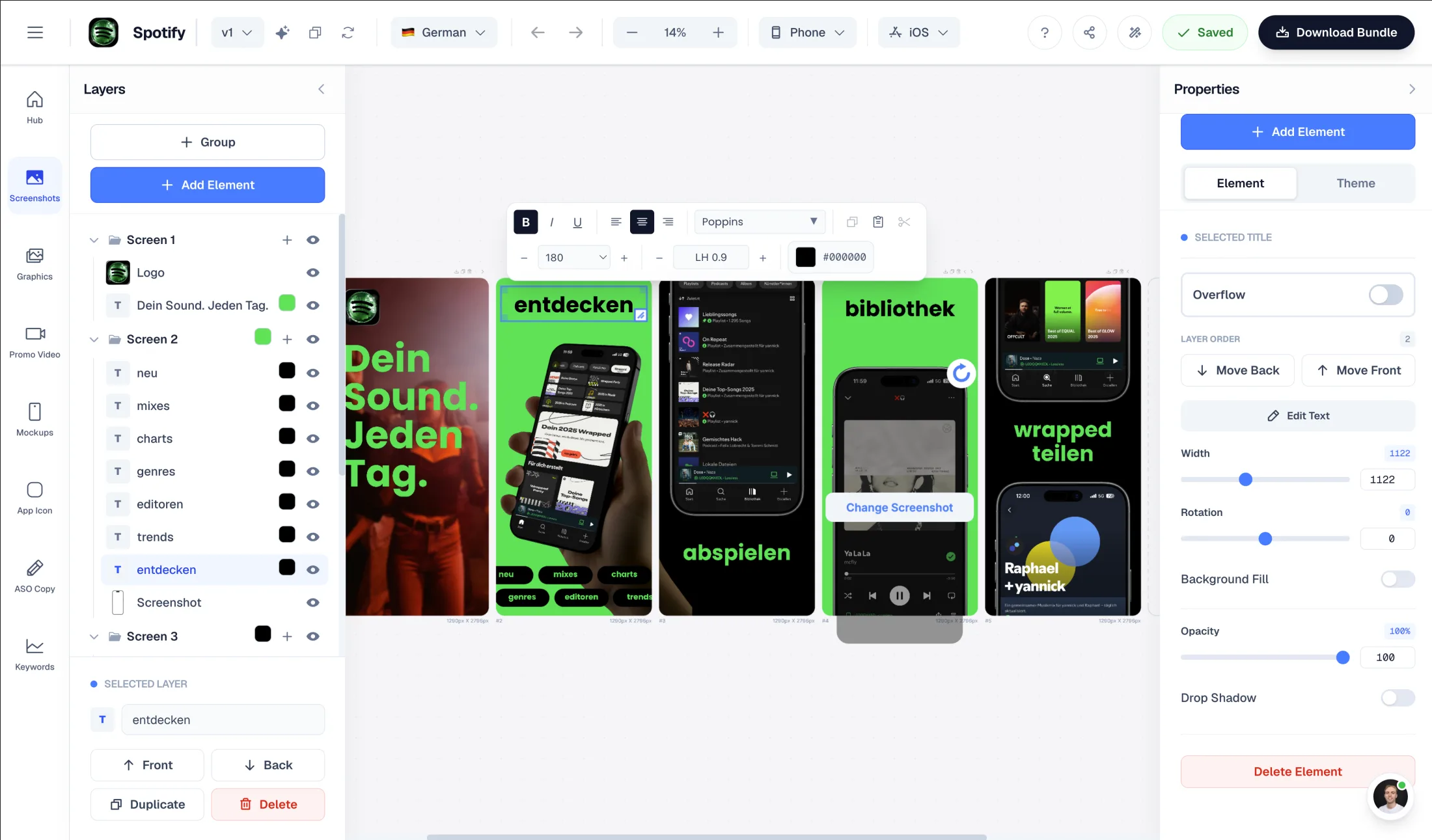
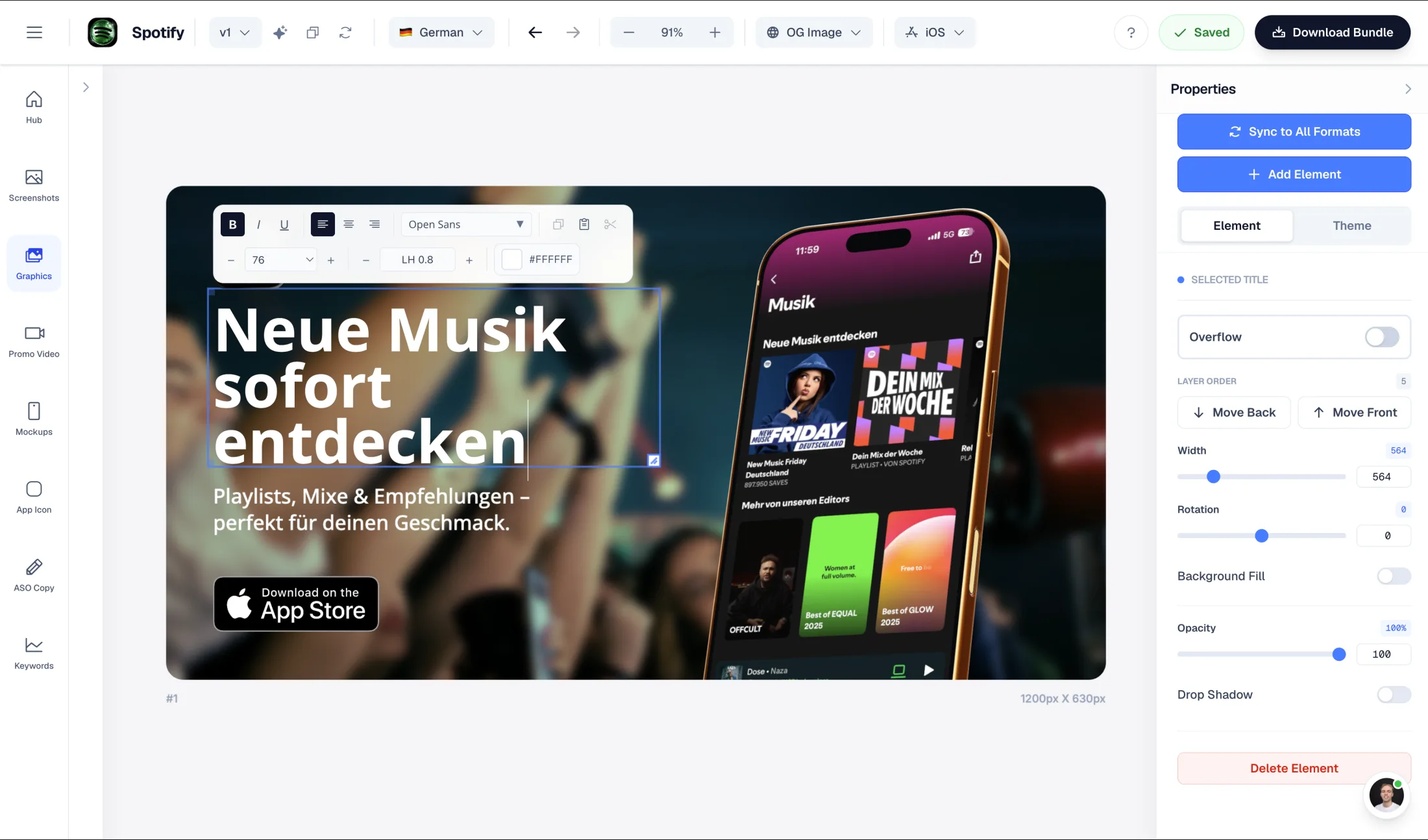
Figma-style drag-and-drop editor to fully customize generated layouts
One-time exports — no monthly tier commitment
Commercial license included — no attribution required

What Screenshots.pro does well

  • No account needed for quick experiments
  • 23 pixel-perfect devices with clay, real, and 3D angle frames
  • API and CI/CD integration for automated screenshot pipelines

Why choose AppLaunchFlow instead

Switch if you want AI to generate your layouts instead of building them manually or via API. Plus ASO copy, promo video, and no attribution hassle.

AppLaunchFlow pricing

€9/month or €90/year. One-time screenshot export €9. One-time promo video export €9.

Screenshots.pro pricing

Basic $0 (requires attribution). Standard $19/month. Extended $49/month.

AppLaunchFlowAppLaunchFlow
vs
Screenshots.proScreenshots.pro

Feature comparison.

A side-by-side look at the features teams compare when choosing their app store asset workflow.

Feature
AppLaunchFlowAppLaunchFlow
Screenshots.proScreenshots.pro

Screenshot creation workflow

AI gives you a polished result without manual work or code.

AI-first: upload screenshots, AI extracts colors and content, generates layouts from selected template

Manual or API-driven: customize templates in browser or automate via CI/CD pipeline

Drag-and-drop editor customization

Yes — Figma-style editor to fully customize layouts after AI generation

Browser template customization plus API-based automation

ASO copy generation

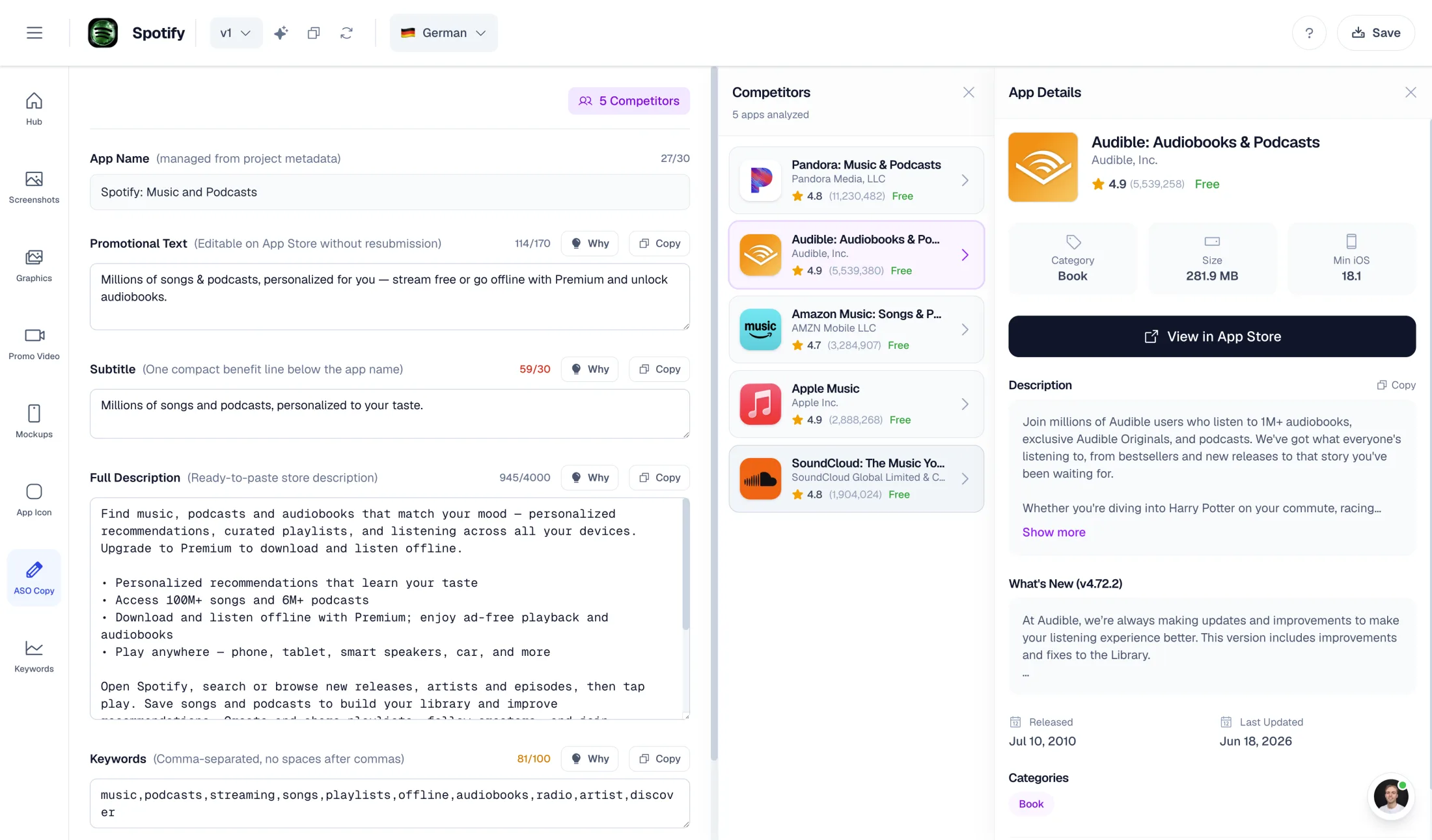
AI generates full listing copy: promo text, short desc, full desc, keywords, categories

Not a feature — screenshot-focused tool

Promo video

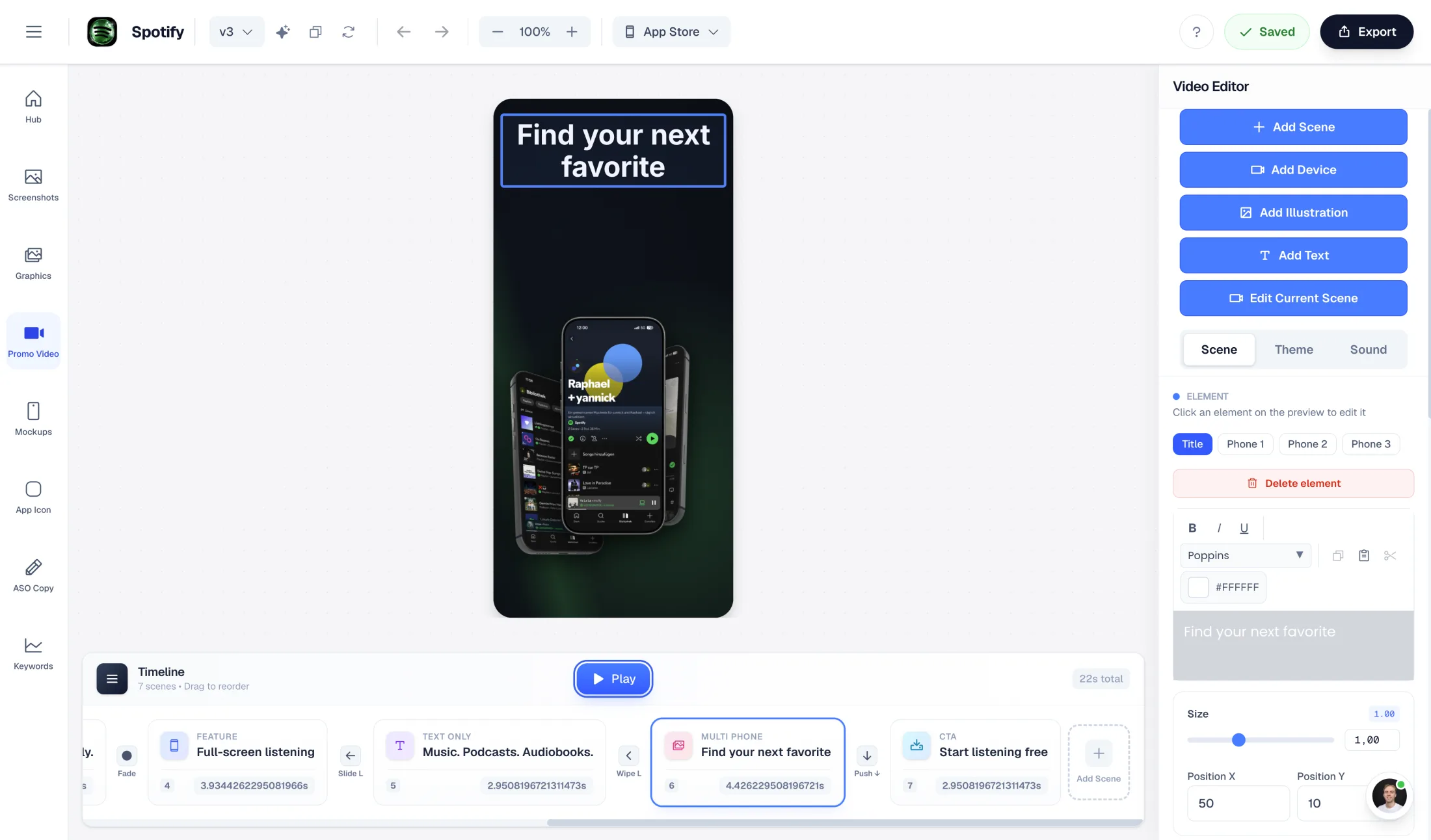
AI-generated promo video from your screenshots (1080p, commercial license)

Not available

Getting started

Screenshots.pro has the lowest possible entry barrier.

Free plan — upload screenshots, AI generates preview

No account needed for basic use

Device frames

Phone and tablet previews + badges, ratings, logos

23 pixel-perfect devices, clay/real/3D angle frames

API / automation

Not available

Full API + CI/CD docs (template → modify via API → render)

License

No attribution worries with AppLaunchFlow exports.

Commercial license included with all exports

Basic requires attribution; Standard removes it; Extended allows client billing

Pricing

€9/month or €90/year

Standard $19/month; Extended $49/month

One-time export

€9 screenshot export or €9 promo video export

Subscription plans only (monthly tiers)

Overview

What are you really optimizing — design, workflow, or output?

Screenshots.pro positions itself as an app screenshot generator with high-quality device frames, panoramic layouts, and the promise of no account needed. For developer teams it adds API and CI/CD automation.

If you search for a Screenshots.pro alternative, it usually means one thing: you want more from your tool than device mockups. You need ASO copy, you want a promo video, or you would rather have AI generate your layouts than build them manually or write API calls.

AppLaunchFlow is built around this idea: your screenshots are the input, AI does the work.

AI Workflow

Upload screenshots. AI generates everything.

The fundamental difference is how assets get created. With Screenshots.pro you either customize templates in the browser or automate via API. Both require manual effort — either clicking or coding.

With AppLaunchFlow you upload your app screenshots. The AI extracts your brand colors, reads your UI content, understands your app identity, and generates complete screenshot layouts based on the template you selected. The same AI pipeline generates your ASO listing copy and can produce a promo video.

One input — your screenshots — drives your entire store listing asset pipeline, and you can fully refine the result afterward in the Figma-style drag-and-drop editor.

Strengths

Where Screenshots.pro is strong

The no-account-needed entry is great for quick tests. And the developer automation use case is real: if you need a CI/CD pipeline that renders screenshots automatically on every build, Screenshots.pro’s API is a genuine differentiator that AppLaunchFlow does not offer.

Billing

Pay to match your release rhythm

Screenshots.pro has monthly tiers starting at $19/month (Standard) and $49/month (Extended). That works for continuous use. Many indie developers and small teams work in sprints instead.

AppLaunchFlow offers one-time purchases: Single Screenshot Export — edit without limits, then export a store-ready ZIP. Single Promo Video Export — 1080p, multiple formats, commercial license. Both at €9.

It is a different model: pay when you need output, not every month.

Licensing

No attribution, no tier confusion

Screenshots.pro’s Basic tier requires attribution. Standard removes it. Extended allows charging clients. That is clear but means you must pick the right tier carefully.

With AppLaunchFlow, every export includes a commercial license by default. The promo video one-time export explicitly includes commercial usage rights. No attribution requirements at any tier.

Frequently asked
questions.

Everything about AppLaunchFlow as a Screenshots.pro alternative

Yes — and that is the point. Instead of an API, AI generates your layouts from uploaded screenshots. No code, no manual template work.
Screenshots.pro is manual or API-driven. AppLaunchFlow is AI-driven: upload your screenshots, AI extracts colors and content, and generates a polished layout you can iterate on.
Yes. The same AI-first approach generates full ASO listing copy (promo text, descriptions, keywords) and promo videos from your screenshots.
Yes. Single Screenshot Export and Single Promo Video Export are one-time purchases at €9 each.
No. Every AppLaunchFlow export includes a commercial license. No attribution required at any tier.
Yes. The AI gives you a polished starting point. You can then adjust text, reorder screens, change properties, and swap template styles freely before exporting.

Ready to launch?
Try it free.

Compare less, ship more. Start building screenshots and ASO copy in one workflow.

Start Free