Yannick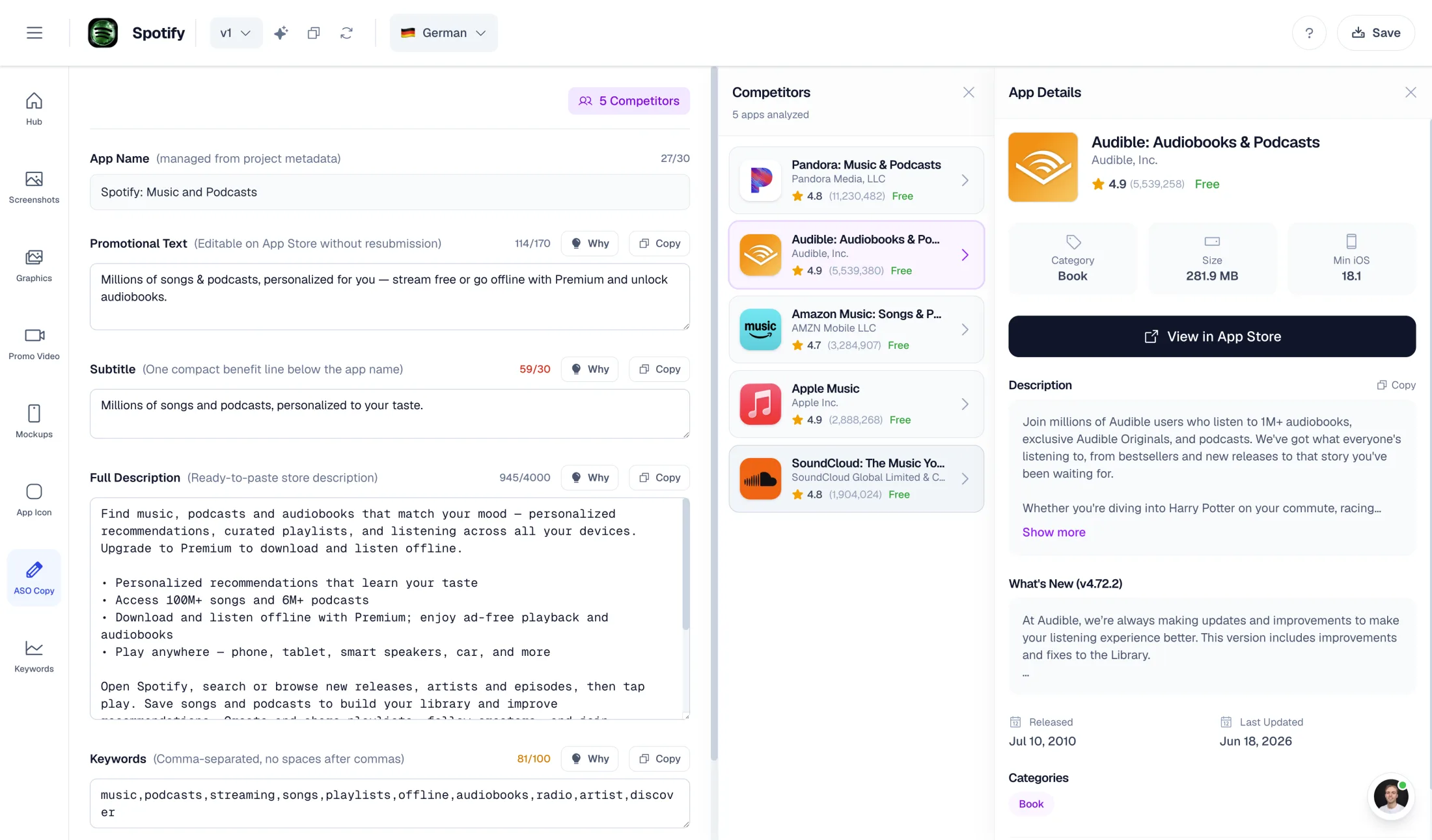
170 characters. One timely reason.
Tell visitors what is worth opening now.
Useful promotional text makes a current benefit specific. It is not another keyword field or a miniature feature list.
Choose
Pick one real update, seasonal use case or useful feature.
Write
Explain the benefit in language your customers use.
Check
Count, localize and verify the claim before publishing.
Promotional text is a small field with a different job from your subtitle, description and release notes. Treat it as a timely invitation above the description: a reason for an interested visitor to understand what is useful right now. The examples below are illustrative drafts, not quotes from live apps.
Quick answer
App Store promotional text allows up to 170 characters, appears above the description and can be updated without submitting a new app version. Apple says it does not affect search ranking. Use it for accurate, timely product news rather than keywords, and check each localized draft separately.
Before and after: make the benefit concrete
Each rewrite replaces an empty adjective with a specific situation. Only use a draft when the feature actually exists in your app. These examples intentionally avoid fabricated ratings, download counts, urgency and guaranteed outcomes.
| Category | Weak draft | More useful direction |
|---|---|---|
| Fitness | The best fitness app just got better! | Plan your next training week in one place. Save your workouts, review your notes, and pick up where you left off. |
| Travel | Travel smarter with amazing features. | Keep your trip details close. Save your itinerary before departure and check your plans even when your connection drops. |
| Photo | Create stunning photos now! | Give your next photo set a consistent look. Save an edit as a preset and reuse it across the rest of your album. |
| Productivity | Work faster. Be more productive. | Start with one priority. Plan a focused session, keep distractions out of your task list, and review what you finished. |
| Game | An epic update you can't miss! | A new puzzle chapter is ready. Try the latest levels, revisit your favorites, and continue your progress from your saved game. |
Use ASO Copy to develop a factually accurate draft, then check its limits before publishing.
A reusable writing pattern
Write the reader's situation first, then the actual product action and benefit. For example: ‘Planning a weekend hike? Save your route notes before you leave, then keep the details close when reception disappears.’ The situation makes the line relevant; the action makes it credible.
Cut any phrase that could describe every app in the category. ‘Powerful’, ‘seamless’ and ‘all-in-one’ use space without telling the visitor what will happen. If a detail cannot be supported in the current build, remove it rather than soften it with an asterisk the visitor may never see.
- Name one benefit and the feature that enables it.
- Use a time-sensitive claim only when it is true and maintained.
- Check paid-plan, account and offline requirements before implying availability.
- Keep the tone consistent with screenshots and the first paragraph of the description.
Promotional text, subtitle and keywords have different jobs
A subtitle needs to explain the app's core value at a glance. The description can explain the workflow and limitations. Release notes describe changes in the version. Promotional text should not become a compressed duplicate of all three.
Keep Apple keyword-field research separate from conversion copy. The metadata checker shows both Unicode character counts and UTF-8 bytes for keywords, because Apple's product-page guide and its App Store Connect reference describe the limit differently. For non-ASCII keywords, confirm the final count in App Store Connect.
Localize the promise, not just the sentence
A literal translation can preserve the word count while losing the reason to care. Ask a reviewer whether the localized draft sounds like the category's normal language, whether the feature is available in that region and whether the screenshot story agrees with it.
Recheck counts after translation and after punctuation edits. Emoji and combining marks can be counted differently across systems; the browser checker is a drafting aid, not the final authority. Paste the final text into App Store Connect and inspect the localized page before publishing.
How to evaluate a change honestly
Record the old copy, new copy, dates, locales and any simultaneous app or campaign changes. Watch product-page visits and downloads alongside acquisition mix. A before/after change in installs is not automatically caused by promotional text, particularly when rankings, paid traffic or release activity also changed.
Do not call this an Apple Product Page Optimization treatment for promotional text: Apple's PPO workflow has its own supported assets and randomized experiment design. Use the appropriate experiment for the question you are asking and distinguish directional observation from a controlled result.
Take the draft into the full copy workflow
Use the free checker when the words are already drafted and you need a local length and formatting review. Use ASO Copy when you need help developing and refining the copy from your app's actual benefits. Neither route replaces a factual, localization and policy review.
Your checker text stays in the browser and is not transferred to Studio. Keep the approved draft in your own release document, then paste each field into the store form and review it there.
Continue the workflow
Primary sources and verification notes
Platform requirements and software capabilities change. These sources were reviewed for this guide on October 16, 2026; open the current source again before publishing assets, enabling production access, or standardizing a team workflow.
- Apple: Creating your product page: Promotional text's purpose, 170-character limit, update behavior and lack of search-ranking effect.
- Apple: Platform version information: Description, keyword and promotional-text field definitions.
- Apple: Product page optimization: Supported experiment assets; do not treat an ordinary copy edit as a randomized PPO result.
Promotional Text Examples FAQ
How long can App Store promotional text be?
Up to 170 characters. Check each localized version and verify the final text in App Store Connect.
Does promotional text improve keyword ranking?
Apple says promotional text does not affect App Store search ranking. Write it to inform interested visitors, not as another keyword list.
Are these examples from actual customers?
No. They are illustrative editorial drafts. Adapt them only to features your current app really provides; no conversion lift is claimed.