Yannick
App Store metadata limits are easy to misremember because some fields use characters, Apple's detailed reference uses bytes for keywords while its marketing guide says characters, and several values are version-specific while others belong to the app record. The table below was checked against Apple's App Store Connect reference on October 16, 2026. Always validate the final value in App Store Connect before submission because Apple can change field rules.
Fast reference
The limits that shape App Store search and conversion
Name: 30 characters
The app name is searchable and must contain at least two characters.
Subtitle: 30 characters
Use it to clarify the product promise without repeating the name.
Keywords: check both counts
Connect's reference says 100 bytes; Apple's marketing guide says 100 characters. Verify the locale in Connect.
App Store metadata limits table
| Field | Limit | Where it applies | Practical use |
|---|---|---|---|
| App name | 2–30 characters | App information | Brand and highest-priority category context |
| Subtitle | 30 characters | Platform/version metadata | Concise differentiation or primary outcome |
| Promotional text | 170 characters | Platform/version metadata | Timely message editable without a new version |
| Description | 4,000 characters | Platform/version metadata | Benefits, features, proof, and important detail |
| Keywords | 100 bytes in Connect's reference; 100 characters in Apple's marketing guide | Platform/version metadata | Comma-separated discovery terms |
| App Review notes | 4,000 bytes | Version submission | Reviewer setup, access, and test instructions |
| What's New | 4,000 characters | New version | User-facing release changes |
The authoritative definitions are Apple's App information reference and platform version information reference.
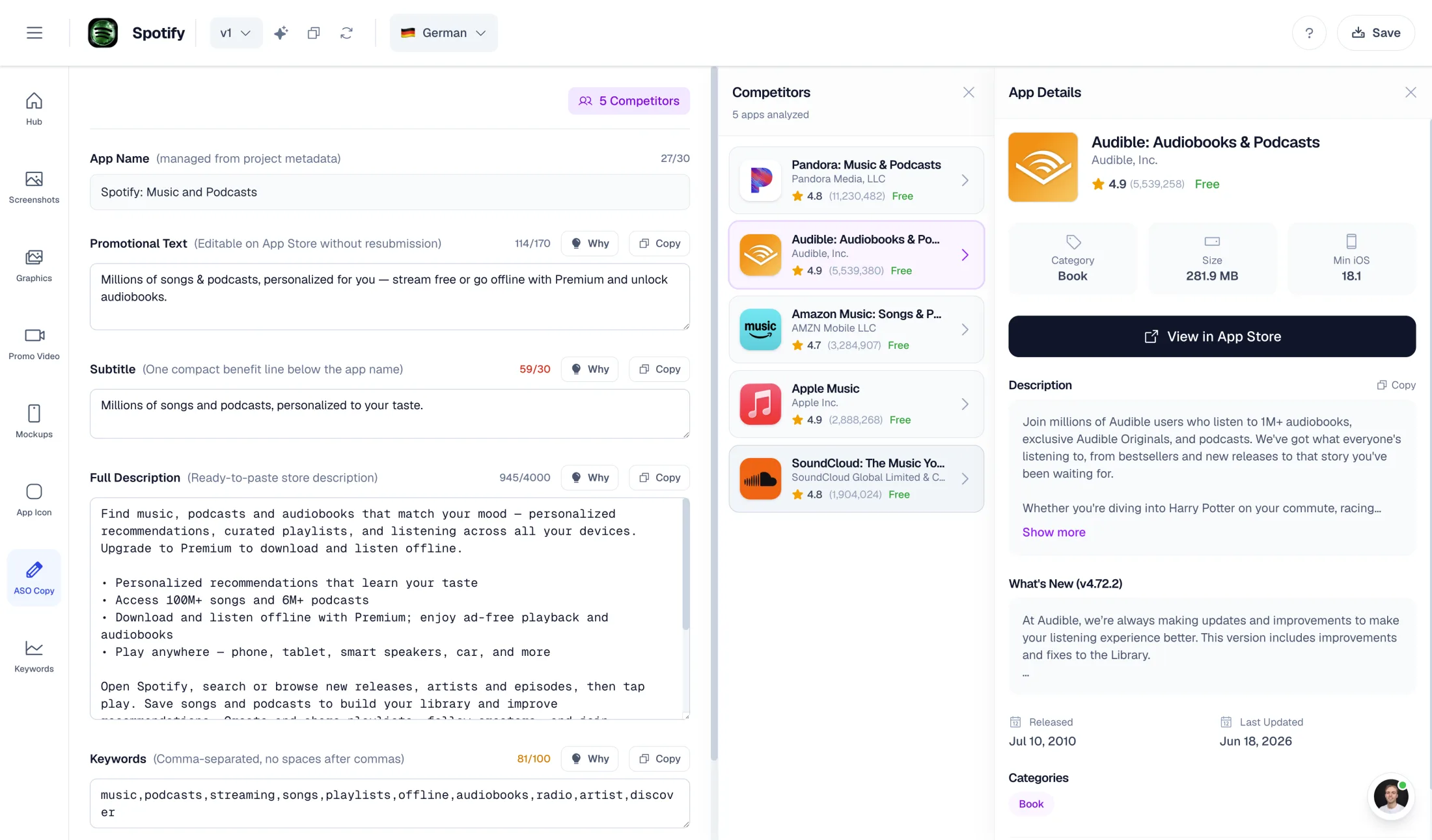
AppLaunchFlow's ASO copy generator keeps every field inside these limits — 30-character name and subtitle, 100-byte keyword field, 170-character promotional text, 4,000-character description — and the same workspace turns that copy into store screenshots.
App name: 2 to 30 characters
The name is one of the strongest identity and discovery fields. It should remain recognizable outside search results, so do not turn it into a list of generic keywords. If the brand is unfamiliar, add one natural descriptor only when it makes the product clearer. Check competing names and trademarks before committing because the chosen name also affects URLs, support content, and launch creative.
Subtitle: up to 30 characters
The subtitle appears directly under the name and should add information rather than restate it. Good subtitles communicate audience, use case, or outcome. Write several candidates, read them together with the app name, and reject any version that sounds repetitive. The name and subtitle are both searchable, so coordinate them with your App Store keyword field.
Keyword field: characters and UTF-8 bytes
Apple's platform-version reference specifies 100 bytes, while its product-page guide says 100 characters. These are not interchangeable for every locale: ASCII letters usually consume one UTF-8 byte, while accented and non-Latin characters can consume more. Display both counts rather than silently enforcing a new interpretation. App Store Connect is the final validator. Use commas without unnecessary spaces, avoid duplicating words already present in the app name or company name, and do not include competitor names. Apple also says individual keywords should contain more than two characters.
A practical workflow is to create a candidate set, reserve the name and subtitle for readable high-value phrases, then use the keyword field for remaining relevant terms. Do not blindly repeat singular and plural forms or every word in a phrase; test whether the combination already covers the intended query.
Promotional text: up to 170 characters
Promotional text sits above the description and can be changed without submitting a new app version. Use it for current events, newly available content, seasonal messaging, or a concise proof point. Because it is temporary and not a substitute for durable metadata, avoid placing the only explanation of a core feature here.
Description: up to 4,000 characters
The description should help a qualified visitor decide, not merely fill the field. Start with the primary outcome and audience, explain the most important workflows, then address differentiators, trust, subscriptions, and support. Apple does not use the iOS description like Google Play uses its full listing copy for search, so prioritize clarity and conversion over repetition.
URLs and contact fields
URLs are constrained primarily by function, not a headline-style character budget. The Support URL must lead to actual contact information. The Marketing URL is optional. A Privacy Policy URL is required for iOS and macOS apps, and it should point directly to a public policy that accurately describes the current app and SDK behavior. Test every URL while signed out and on mobile.
App Review notes: up to 4,000 bytes
Review notes are operational. Explain hidden functionality, test accounts, special hardware, geographic requirements, subscriptions, external integrations, and any non-obvious path the reviewer must follow. If login is required, Apple asks for an active, non-expiring demo account. Keep the note structured with short steps and expected results rather than a product-marketing paragraph.
Localization changes the budgeting problem
A sentence that fits in English can overflow in German or require different segmentation in Japanese. Do not force literal translations into the same character shape. Give translators the intent of each field, the target query, forbidden claims, and the exact validated limit. Then preview the localized name, subtitle, screenshots, and description together.
Pre-submission metadata audit
- Count characters and bytes using the correct rule for each field.
- Remove duplicated or misleading claims.
- Read the name and subtitle as a single unit.
- Verify that URLs work without internal access.
- Confirm every localization uses the current product terminology.
- Check screenshot copy against the same positioning.
- Paste final values into App Store Connect and resolve its validation output.
When the metadata is ready, use the App Store submission checklist to verify the build, privacy, review-access, and release settings around it.
Practical deep dive
Manage metadata as a field-level release artifact
Character limits are the outer constraint. The real work is assigning one job to each indexed or visible field, preserving meaning across locales, and validating the exact text that will accompany the submitted build.
| Field decision | Question | Evidence | Review risk |
|---|---|---|---|
| Primary promise | Which field states the category and outcome? | Search intent and positioning | Repeated or vague copy |
| Keyword coverage | Which eligible field carries each term? | Versioned word map | Wasted space or mismatch |
| Localization | Does meaning survive the field limit? | Native in-context review | Truncation or literal translation |
| Release accuracy | Does copy match the build and offer? | Final listing preview | Review or trust problem |
Write from a field map
List every field, platform, locale, limit, indexing role, visible placement, owner, and source term. Draft the app name, subtitle or short description, promotional text, description, keywords, and release notes as one system rather than isolated snippets.
Use characters for distinct meaning, not repetition. Preview punctuation, emoji, line breaks, and long translations in the actual console because a string that passes a local counter can still read poorly or be invalid under current store rules.
Frequently asked questions
Why do metadata character limits matter?
They force each field to communicate a distinct job while staying valid for the store, locale, and visible product page.
Should keywords be repeated across fields?
Avoid unnecessary repetition in eligible Apple metadata and use Google Play phrases naturally in readable visible copy.
How should localized metadata be checked?
Validate limits after translation, review meaning with a native speaker, and inspect the final text in App Store Connect or Play Console.
Sources and next steps
Continue with keyword field guide, App Store keyword research, and Google Play ASO guide.