AppLaunchFlow
vs
Nuvex

The Nuvex Alternative
with AI speed and full editor control.

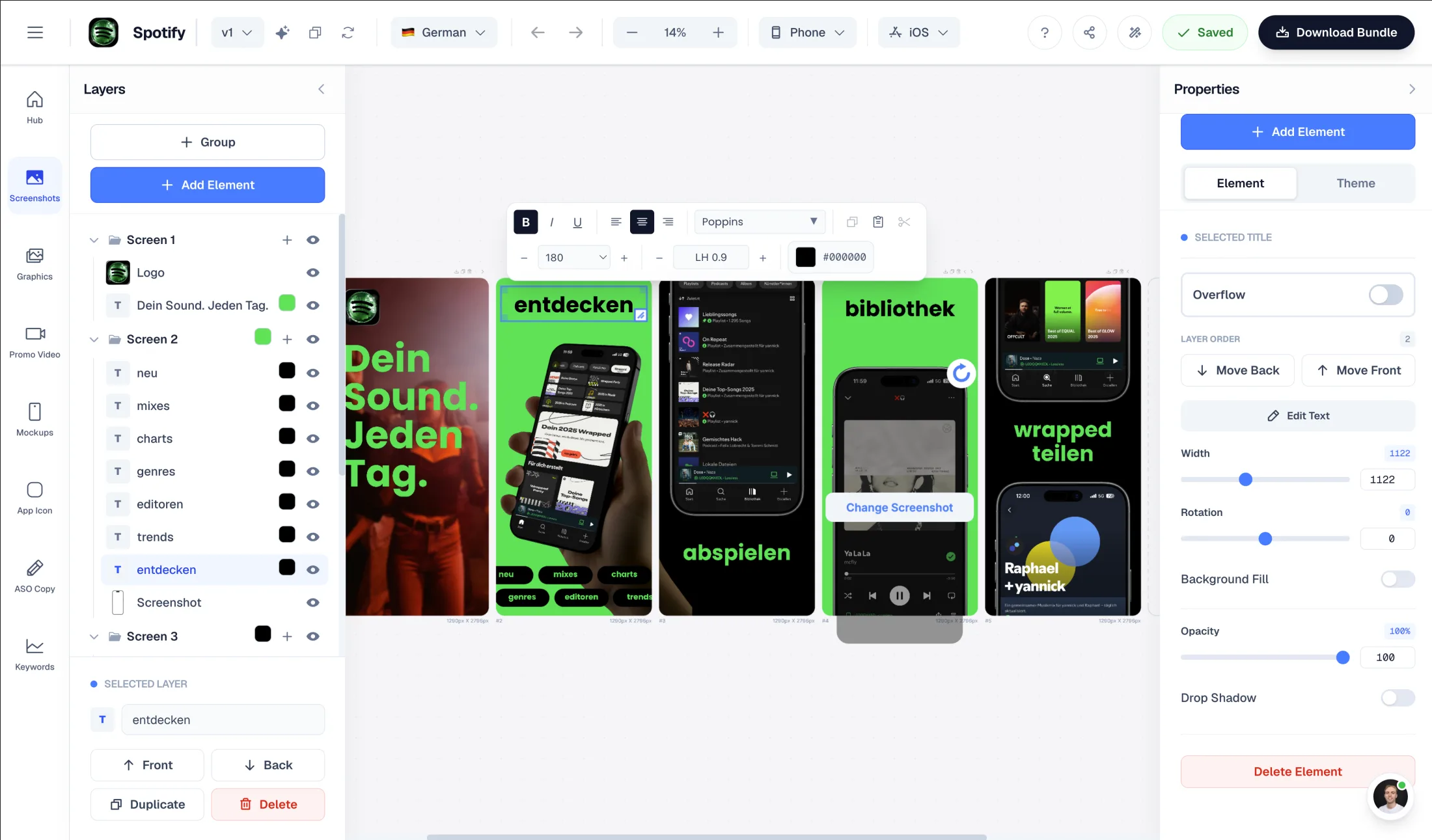
Nuvex generates a screenshot set with AI in about 30 seconds — but every change is another AI prompt that costs credits, and there is no manual editor. AppLaunchFlow is AI-first too: upload your screenshots, AI generates the layout — then you refine everything yourself in a Figma-style editor, with ASO copy and promo video in the same workflow.

Upload screenshots → AI generates layouts automatically
Figma-style drag-and-drop editor — edit freely, no credits per change
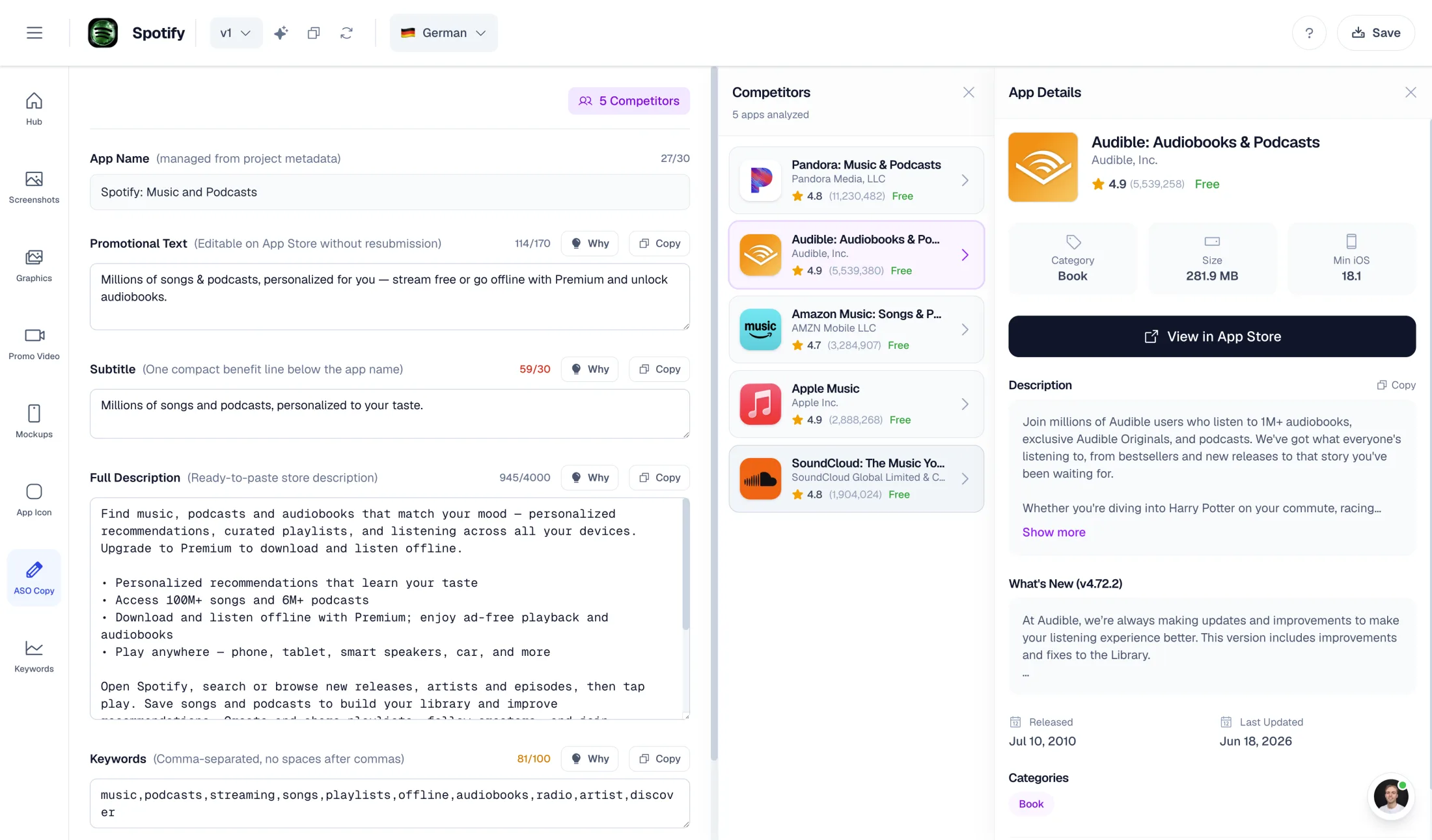
AI-powered ASO copy: promo text, descriptions, keywords
One-time export at €9 — no subscription required

What Nuvex does well

  • Fast AI generation: a full 5-frame screenshot set in about 30 seconds
  • Per-frame regeneration — edit one frame without touching the rest
  • Non-expiring one-time credit packs starting at $5
  • Headline localization in 20+ languages including RTL (Arabic, Hebrew)

Why choose AppLaunchFlow instead

Switch if you want AI generation plus real manual control. In Nuvex every adjustment is a credit-metered AI edit with no pixel-level control. AppLaunchFlow gives you an AI-generated starting point you refine freely in a Figma-style editor — plus ASO copy and promo video from the same input.

AppLaunchFlow pricing

€9/month or €90/year. One-time screenshot export €9. One-time promo video export €9.

Nuvex pricing

Free: 3 watermarked previews. Starter $12/month or $96/year. Pro $29/month or $228/year. Credit packs from $5; each frame costs 2–7 credits depending on quality.

AppLaunchFlowAppLaunchFlow
vs
NuvexNuvex

Feature comparison.

A side-by-side look at the features teams compare when choosing their app store asset workflow.

Feature
AppLaunchFlowAppLaunchFlow
NuvexNuvex

Screenshot creation workflow

Both are AI-first. The difference is what happens after generation.

AI-first: upload screenshots, AI extracts colors and content, generates layouts from selected template

AI-only: upload around 5 screens plus a description, a dual-AI pipeline composes a 5-frame set in about 30 seconds

Manual editing after generation

Nuvex itself describes its AI as opinionated and says a template editor 'will feel less frustrating' for fine control.

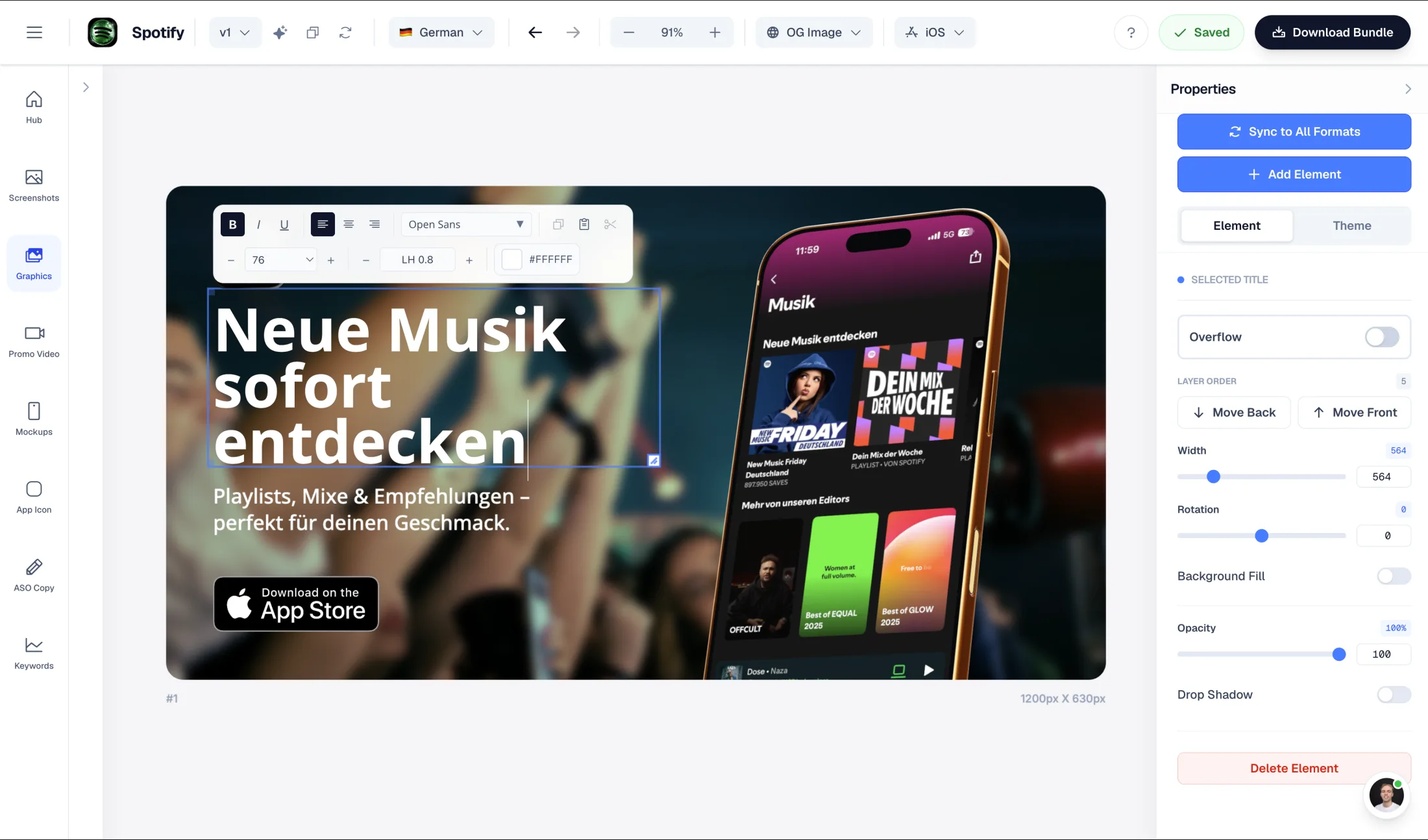
Figma-style drag-and-drop editor — unlimited free adjustments to text, layout, and styles

Plain-English AI edit prompts only; each re-rendered frame costs 2–7 credits, no pixel-level control

Templates & styles

Nuvex markets the absence of templates as uniqueness; AppLaunchFlow uses templates for predictable, store-proven structure.

17 curated styles — AI populates them from your screenshots

No templates by design — every set is AI-composed from scratch

ASO copy generation

AI generates promo text, short desc, full desc, keywords, categories + competitor lookup

AI writes the 5 screenshot headlines; no listing copy, descriptions, or keywords

Promo video

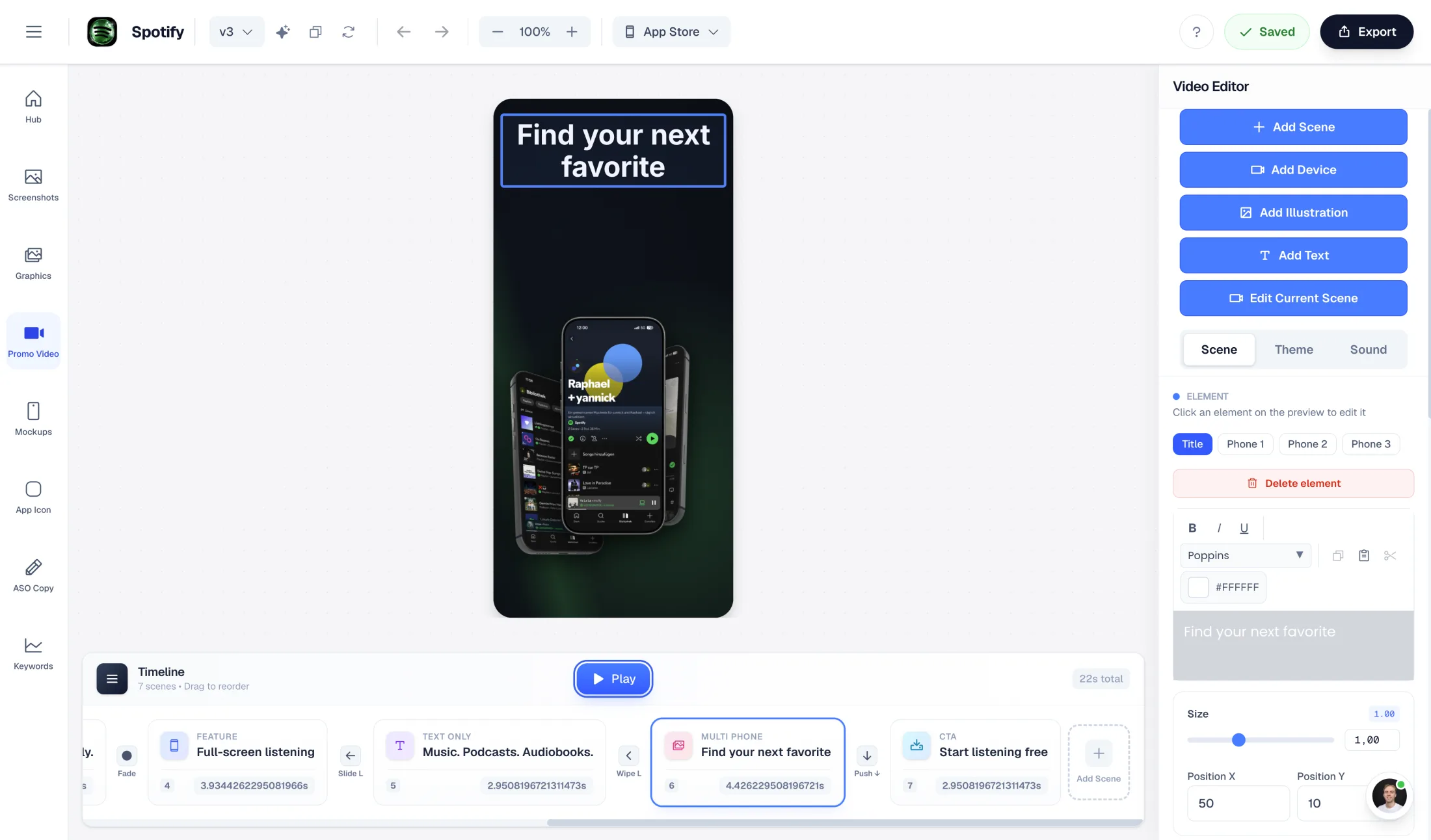
AI-generated promo video from your screenshots (1080p, commercial license)

Not available — Nuvex states this on its own comparison pages

Localization

Unlimited translations (Pro) for localized store listings

Headline regeneration in 20+ languages including RTL

Pricing model

With credits, iterating on a design has a running cost; flat pricing doesn't.

Flat €9/month, or one-time €9 exports — no usage metering

Credit-metered: 2–7 credits per frame for both generations and edits

Free tier

Free plan for AI generation and preview; full-resolution export is paid

6 free credits — roughly 3 watermarked preview generations, no HD downloads

Store-ready exports

iOS and Android, phone and tablet, full resolution

All Apple and Google sizes including the 1024×500 Play feature graphic (paid plans)

Overview

Two AI-first tools, one key difference

Nuvex is one of the few screenshot tools that, like AppLaunchFlow, generates layouts with AI instead of handing you an empty template. You upload a handful of app screens and a one-line description, and its dual-AI pipeline — one model writes a creative brief, another renders the frames — produces a designed 5-frame set in about 30 seconds.

So why look for a Nuvex alternative? Usually because of what happens after that first generation. Nuvex has no manual editor: every change is another AI prompt, every re-rendered frame costs 2–7 credits, and there is no pixel-level control. And the screenshots are where Nuvex stops — there is no ASO copy, no promo video, and no store upload.

Editor Control

AI generation you can actually edit

AppLaunchFlow uses AI the same way Nuvex does — to get you from raw screenshots to a composed, store-ready layout without manual design work. The AI extracts your brand colors, reads your UI content, and fills your chosen template style.

The difference is the next step. In AppLaunchFlow you land in a Figma-style drag-and-drop editor where you can change any headline, reorder screens, swap styles, and adjust every element directly — without spending credits or hoping the AI interprets your prompt correctly. Nuvex acknowledges this trade-off openly: its own comparison pages note that users wanting fine control will find a template editor less frustrating.

Beyond visuals

ASO copy and promo video from the same input

Nuvex's AI writes your five screenshot headlines, and that is the extent of its copywriting. AppLaunchFlow generates the full listing: promotional text, short and full descriptions, keyword suggestions, and category ideas — from the same screenshots and project context that drive your visuals.

The same pipeline can also produce an AI-generated promo video (1080p with a commercial license), which Nuvex does not offer at all.

Billing

Flat pricing vs. credit math

Nuvex bills per frame: 2 credits for low quality, 3 for medium, 7 for high — and edits cost the same rates. Its $5, $12, and $25 credit packs never expire, which is genuinely convenient for a single quick set. But if you iterate — and AI output usually needs iteration — costs accumulate per change.

AppLaunchFlow is flat: €9/month (or €90/year) with unlimited editing, or a one-time €9 screenshot export and €9 promo video export if you only need to ship one release. You never have to budget credits for tweaking a headline.

Where Nuvex wins

An honest note on speed and uniqueness

If you want a one-off set with zero learning curve, Nuvex is impressively fast, and its no-template approach means your set will not look like anyone else's. The $5 entry pack makes a quick experiment nearly free, and per-frame regeneration is a clever way to fix one screen without touching the rest.

Where it ends is control and scope: no manual editor, no listing copy, no video, no store handoff. If those matter to your launch, the credit-per-edit model starts working against you.

Decision

Which alternative is better — and for whom?

Choose Nuvex if you want the fastest possible AI-only set, are happy to accept the AI's design decisions, and only need screenshots — no copy, video, or localization workflow.

Choose AppLaunchFlow if you want AI generation plus a real editor to refine the result, ASO copy and promo video from the same input, and flat pricing with one-time export options.

Frequently asked
questions.

Everything about AppLaunchFlow as a Nuvex alternative

Yes. Both generate App Store screenshots with AI from your uploaded screens. AppLaunchFlow adds a Figma-style manual editor, full ASO listing copy, promo video generation, and flat pricing instead of per-frame credits.
Nuvex has no manual editor — you describe changes in plain English and pay 2–7 credits per re-rendered frame. AppLaunchFlow gives you a Figma-style drag-and-drop editor where every adjustment is free and direct.
No. Nuvex writes the headlines on your screenshots but does not generate listing copy, and it does not produce App Preview or promo videos. AppLaunchFlow does both from the same screenshots.
Nuvex is credit-metered: plans from $12/month or one-time packs from $5, with each frame generation or edit costing 2–7 credits. AppLaunchFlow is flat: €9/month, €90/year, or one-time €9 exports with unlimited editing.
Nuvex regenerates screenshot headlines in 20+ languages including RTL. AppLaunchFlow Pro includes unlimited translations for localized screenshot sets and store listings.
Yes, both tools export Apple and Google store sizes. AppLaunchFlow covers iOS and Android, phone and tablet, in Pro and with one-time exports.

Ready to launch?
Try it free.

Compare less, ship more. Start building screenshots and ASO copy in one workflow.

Start Free